Audiences
Audiences is where you define the people a brand wants to reach. Create profiles manually or let Revlis draft one from the Active Brand's existing context.
Audience profiles are scoped to the Active Brand. Switching brands shows that brand's audiences.
Each audience opens into three tabs: Profile, Awareness Journey, and How They Choose.
Profile
The Profile tab holds who the audience is, in three groups.
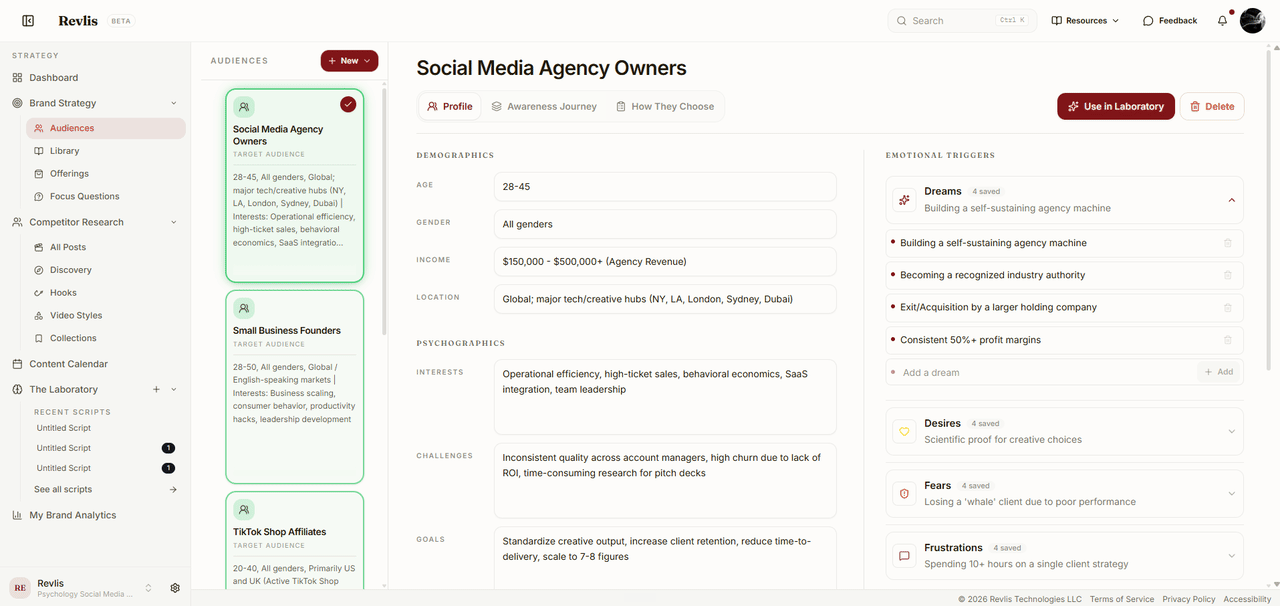
| Group | Fields |
|---|---|
| Demographics | Age, Gender, Income, Location. |
| Psychographics | Interests, Challenges, Goals, Values, Habits, Influences, Info Sources. |
| Emotional Triggers | Dreams, Desires, Fears, Frustrations. |
Emotional Triggers hold lists rather than single answers. Open one to add entries, and the header shows how many you have saved.
Fill in the details that materially change how the brand should speak. Leave uncertain fields blank instead of guessing.
Creating an audience
Click Generate from brand to draft a complete profile from the brand's saved context. Review and edit the result before you use it.
Start from a blank audience when you already know who you are speaking to and want to write the profile yourself.
Revlis passes your saved audiences to the generator as context, so each new profile aims at a segment you have not covered yet.
If a draft misses the mark, generate again without accepting it. Revlis keeps track of the drafts it already showed you in that sitting and is told not to repeat them, so the next one has to be a genuinely different segment rather than a reworded version. That history clears when you close the generator.
Awareness Journey
The Awareness Journey tracks how the audience's needs and language change as they move from cold attention to ready to act. Each stage carries the job your content has to do there.
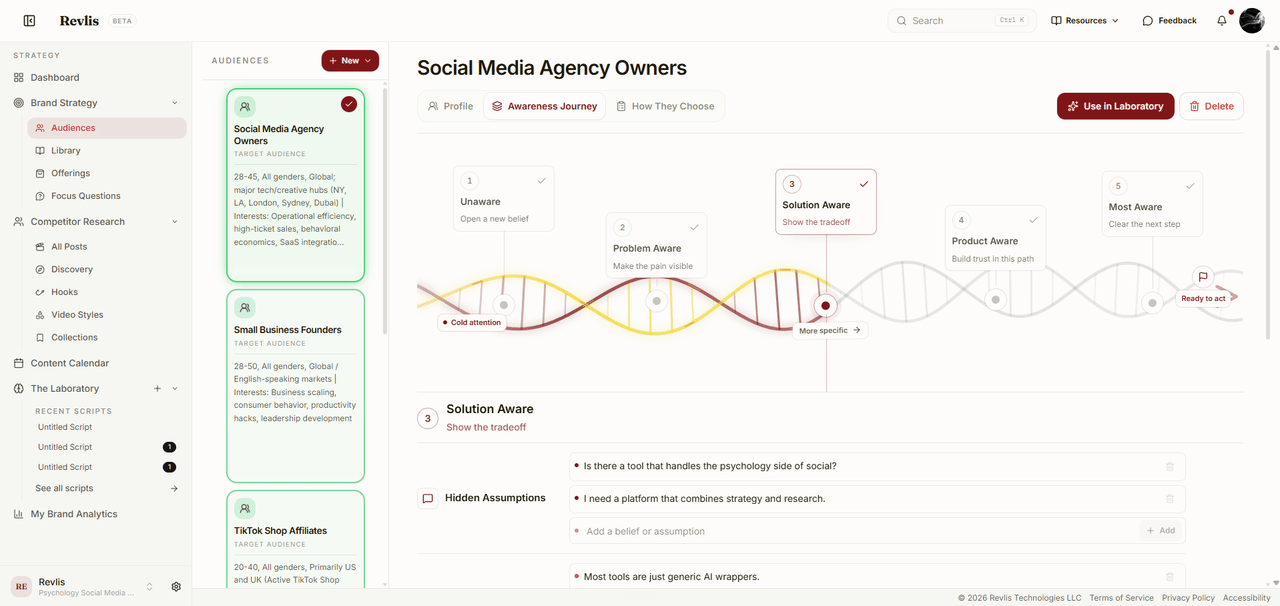
| Stage | Where they are | The job your content has |
|---|---|---|
| Unaware | They do not recognize the problem yet. | Open a new belief |
| Problem Aware | They feel the problem but do not know the solutions. | Make the pain visible |
| Solution Aware | They know solutions exist and are comparing approaches. | Show the tradeoff |
| Product Aware | They know your offering and are deciding whether it fits. | Build trust in this path |
| Most Aware | They understand the offering and need a reason to act now. | Clear the next step |
Click a stage to open it. Each one holds five lists you fill in for that point in the journey:
- Hidden Assumptions: the beliefs they hold without stating them.
- Friction: the risks and worries slowing them down.
- Objections: the reasons they hesitate.
- Motivators: the reasons they move.
- Content Opportunities: the angles and hooks that fit this stage.
How They Choose
The How They Choose tab records the Buyer Evaluation behind a purchase decision:
- Decision Criteria: the proof points or requirements the audience uses to judge an option.
- Existing Approaches: the tools, workarounds, or habits they already rely on.
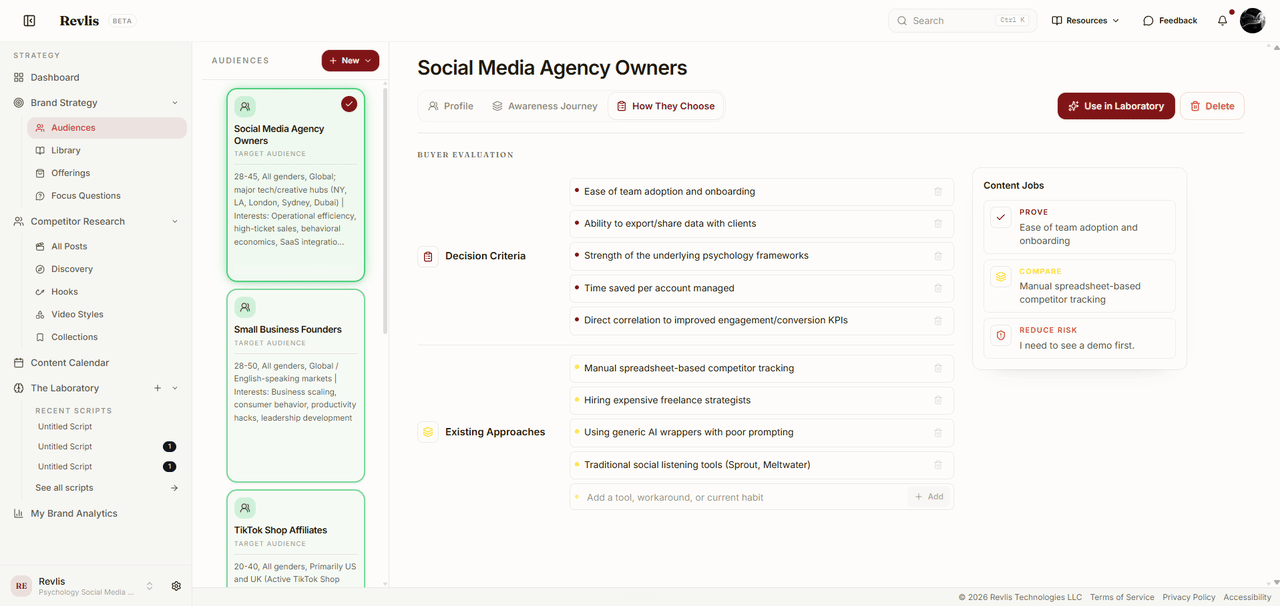
Revlis combines these with the objections and fears from the Awareness Journey to produce three Content Jobs:
- Prove takes a decision criterion and shapes the proof your content should provide.
- Compare takes an existing approach and frames the alternative you are up against.
- Reduce risk draws on later-stage objections and fears to surface the barrier to address.
Using audiences
Audience profiles appear across Revlis:
- Brand Strategy: shows the audiences connected to the current strategy.
- The Laboratory: adds an audience as script context with Use in Laboratory.
- Offerings: links buyer objections to specific audience profiles.
- Research: infers an audience for a tracked creator once enough of their posts are deeply analyzed.
When you are ready to write for one of these audiences, open The Laboratory.