Brand Strategy
Brand Strategy is where you review and refine the context Revlis uses for the Active Brand. It connects the brand's positioning, voice, niche, subniches, audiences, offerings, content pillars, competitors, platforms, and psychology notes.
You can edit strategy sections over time. Changes made in Brand Strategy and the Library stay connected because both surfaces use the same saved strategy cards.
Build strategy
Click Build strategy to turn public website pages and brand notes into a proposed strategy.
Revlis reads the sources you provide and drafts strategy context from them. A completed build can include:
- A brand description and niche.
- Subniches.
- Audience profiles.
- Four default content pillars: Educate, Entertain, Inspire, and Promote.
- Other strategy cards the sources support.
Value propositions are not generated by the Strategy Builder. Create them from the Library when you are ready to define the reasons customers choose the brand.
Review and approve
A finished build opens as a proposal. Nothing is written to the brand or Library until you approve it.
Review the proposed niche and cards, reject anything that does not fit, and adjust the direction where needed. Click Save to Library to commit the approved strategy.
If you leave before saving, return to Brand Strategy and click Review & approve to continue.
Accounts created on or after August 5, 2026 (UTC) must complete and save a strategy for their first brand before they can use the rest of the desktop app. Accounts created before that date are not blocked. Every brand after the first prompts you to build a strategy, but never blocks the rest of the workspace.
Presets and layouts
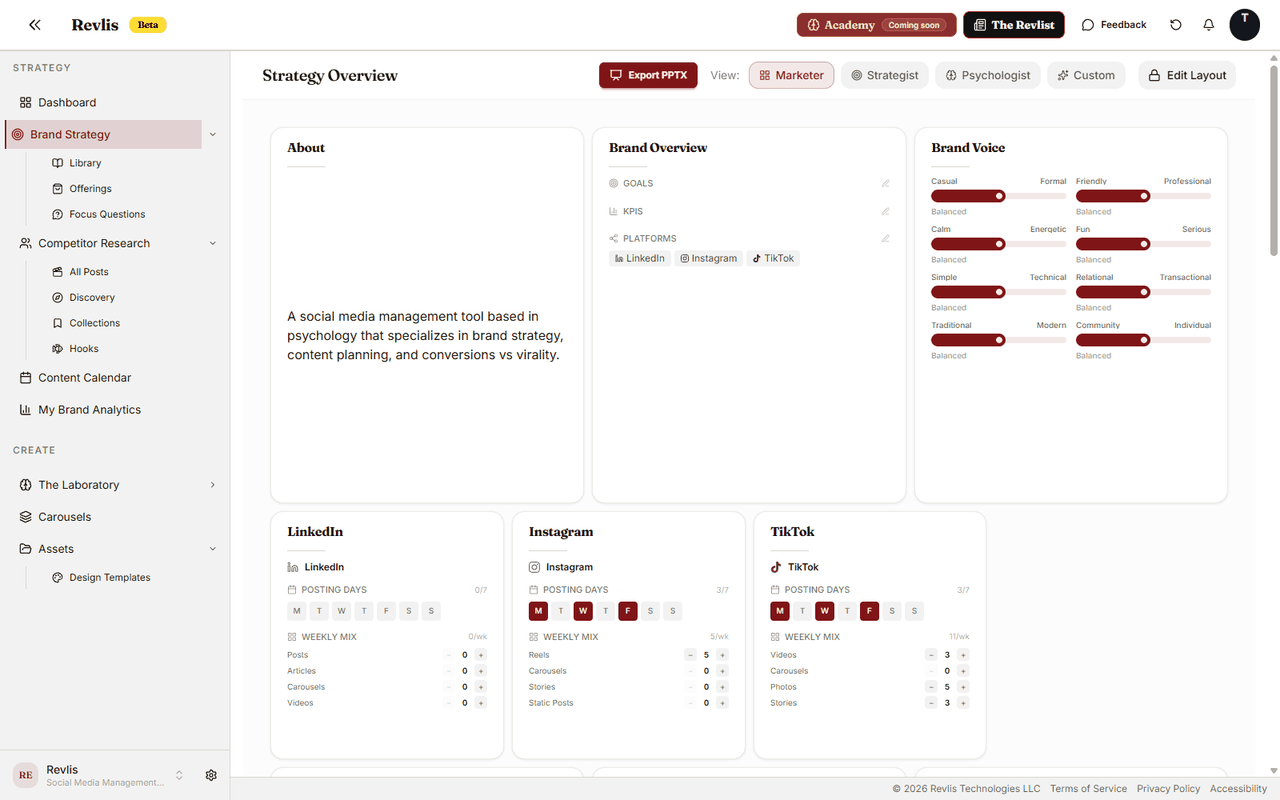
Presets quickly arrange the strategy page around different kinds of work:
| Preset | Leads with |
|---|---|
| Marketer | Brand, value propositions, offerings, and competitors |
| Strategist | Audiences, subniches, and content pillars |
| Psychologist | Psychology cards and audience context |
Once you drag or resize anything, Revlis switches the page to a Custom layout and remembers it for that brand.
Click Edit Layout to rearrange and resize sections. You can also press Ctrl+E, or Cmd+E on Mac. Revlis saves layout changes automatically.
If your Custom layout was saved before the Sub-Niches section was added, apply a preset once to pick it up. You can customize the layout again afterward.
Strategy sections
See the main Brand Strategy sections
Brand
| Section | What it holds |
|---|---|
| About | What the brand is, who it serves, and how it is positioned. |
| Brand Overview | Goals, target platforms, and success measures. |
| Brand Voice | The tone and style Revlis should keep in mind. |
| Sub-Niches | The focused parts of the niche the brand creates content about. |
Content and sales
| Section | What it holds |
|---|---|
| Value Propositions | The main reasons someone chooses this brand. |
| Offerings | The products, services, subscriptions, and resources this brand promotes. |
| Repetitions | Phrases, taglines, or repeated ideas the brand uses often. |
| Educational Pillar | One or more pillars for teaching, how-to, and knowledge content. |
| Inspirational Pillar | One or more pillars for motivation, vision, and transformation content. |
| Promotional Pillar | One or more pillars for offers, proof, and sales content. |
| Entertainment Pillar | One or more pillars for humor, relatability, and trends. |
The four pillar sections are categories, not a four-card limit. Add multiple content pillars within any category when the brand needs more specific themes.
Audience
Audience sections show the profiles created in Audiences. Open an audience to edit its demographics, interests, challenges, goals, values, habits, influences, and awareness journey.
Psychology
| Section | What it holds |
|---|---|
| FOMO | Scarcity-based messaging ideas. |
| Reciprocity | Give-first messaging ideas. |
| Social Proof | Proof, trust, and credibility ideas. |
Competitors
Competitor sections connect tracked creators and their research data to the strategy. Open Research for the full Creator Detail and Post Detail views.
Platforms
Platform sections appear based on the platforms selected in Brand Overview. Each one helps you keep track of posting days and the mix of formats you want to create for that platform.
Export to PPTX
When strategy export is available on your plan, click Export PPTX to create a PowerPoint version of the brand strategy. Use it to share the strategy with a client, stakeholder, or teammate outside Revlis.