Dashboard
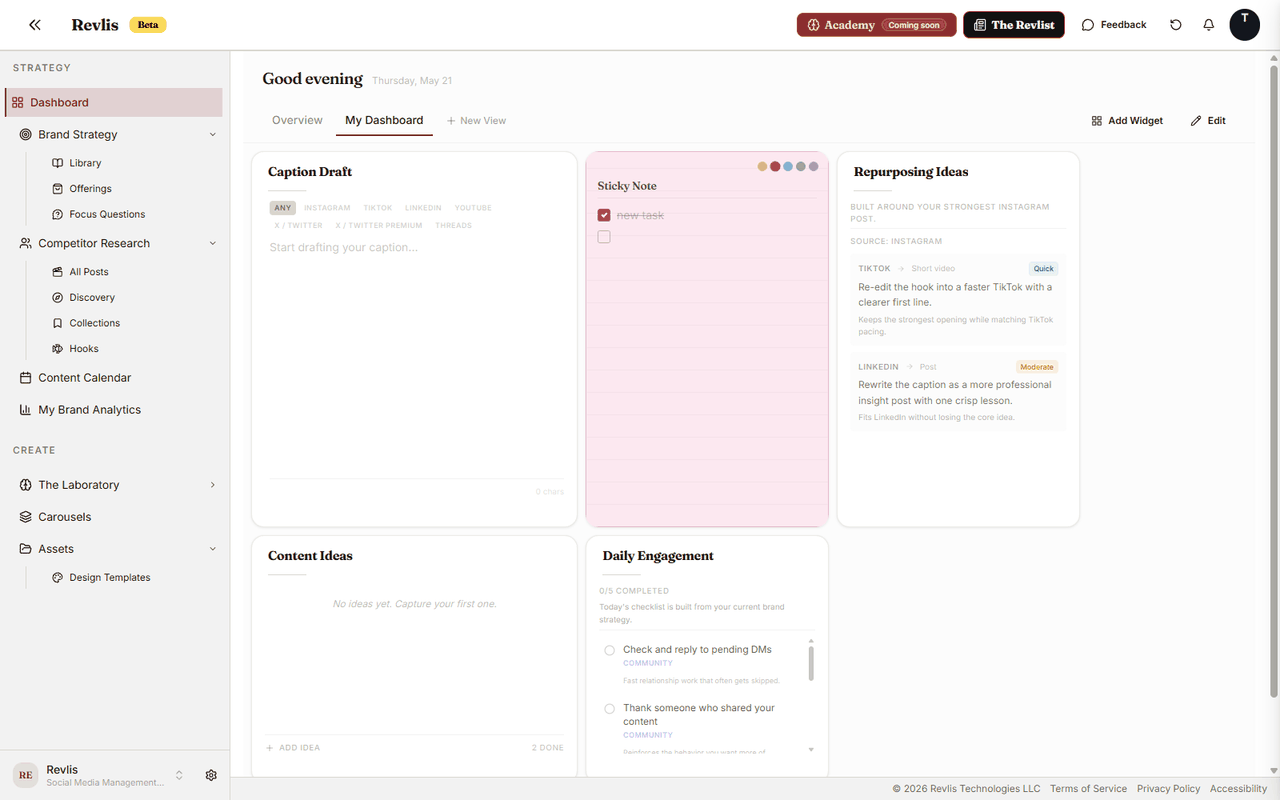
The Dashboard gives each brand a home base. Use it to keep the information you check often in one place: performance snapshots, strategy notes, audience cards, offerings, competitor references, content ideas, and pinned posts from Research.
Each brand has its own Dashboard. Changing one brand's Dashboard does not change another brand's Dashboard.
Start with the default Overview. Add one or two blocks you check often, then adjust the layout as your routine becomes clearer.
Views
A view is a saved Dashboard layout. You can have up to 8 views per brand.
Use views to separate different kinds of work. For example, you might keep one view for strategy, one for content planning, and one for analytics. If you prefer one simple workspace, you can keep everything in the Overview view.
To create a view, click New View in the tab bar, enter a name, then click Add. To rename one, double-click the tab, or right-click the tab and choose Rename. Right-click a tab for more options, including duplicate, move, and delete.
| View idea | Useful widgets |
|---|---|
| Strategy | About, Brand Voice, Audiences, Content Pillars |
| Planning | Content Ideas, Weekly Posting Goals, Offerings, Pinned Posts |
| Performance | Brand Pulse, Top Performer, Growth Momentum, Content Score |
Widgets
Widgets are the blocks you add to the Dashboard. To add one, click Add Widget. Search for a block by name or browse by category.
To move or resize widgets, click Edit or press Ctrl+E. Drag a widget by its handle, resize it from the corners, then click Done. Revlis saves your layout automatically.
Each view saves its own layout independently, so rearranging one view doesn't affect the others.
Widget reference
See all Dashboard widgets
Workflow
| Widget | What it does |
|---|---|
| Caption Draft | Draft captions with platform-aware character counts. Add as many as you need. Each is its own independent draft. |
| Content Ideas | Capture and organize content ideas in one place. |
| Daily Engagement | Work through a daily set of community, promotion, and growth tasks for the Active Brand. Completions reset each day. This widget is not in the Add Widget catalog. |
| Weekly Posting Goals | Track your posting progress against your weekly schedule. |
| Repurposing Ideas | Find ways to turn strong content into more posts for other platforms. |
Analytics
| Widget | What it does |
|---|---|
| Brand Pulse | See a quick 30-day snapshot of reach, engagement, followers, and posting momentum. |
| Top Performer | See your strongest recent post. |
| Competitor Edge | Compare your performance against selected competitors when comparison data is available. |
| Growth Momentum | See recent follower growth and whether you are posting consistently. |
| Content Score | Get a quick read on content health across engagement, consistency, growth, and competition. |
Brand & Strategy
| Widget | What it does |
|---|---|
| About | Your brand story and positioning. Editable inline. |
| Brand Overview | Goals, platforms, and KPIs for the Active Brand. Editable inline. |
| Brand Voice | Tone and voice settings. Editable inline. |
| Value Propositions | Your value proposition cards from the library. |
| Offerings | A grid of your offerings. |
| Repetitions | Repeated brand phrases and taglines. Editable inline. |
| Educational Pillar | Your educational content pillars from the library. |
| Inspirational Pillar | Your inspirational content pillars from the library. |
| Promotional Pillar | Your promotional content pillars from the library. |
| Entertainment Pillar | Your entertainment content pillars from the library. |
| Sticky Note | A freeform note. Add as many as you need. Each holds its own content. |
Audience
| Widget | What it does |
|---|---|
| Primary Audience | Your primary target audience profile from the library. |
| Secondary Audience | Your secondary target audience profile from the library. |
| Tertiary Audience | Your tertiary target audience profile from the library. |
Psychology
| Widget | What it does |
|---|---|
| FOMO | Scarcity psychology references from the library. |
| Reciprocity | Reciprocity psychology references from the library. |
| Social Proof | Social proof psychology references from the library. |
Competitors
| Widget | What it does |
|---|---|
| Primary Competitor | Your first competitor comparison. |
| Secondary Competitor | Your second competitor comparison. |
| Tertiary Competitor | Your third competitor comparison. |
Platforms
One widget per platform: Instagram, TikTok, LinkedIn, YouTube, X / Twitter, Threads, Blog, and Other Platform. Each helps you keep track of posting days and the mix of formats you want to create for that platform.
Pinned posts
You can pin an eligible analyzed post from Research directly to any Dashboard view. Revlis creates a Pinned Post widget in the view you choose. Use pinned posts to keep inspiration, examples, or competitor references visible while you plan and write.