Using a Blueprint
A Research blueprint helps you learn from a strong post without copying it. Revlis adds the analyzed post to the Laboratory so you can choose which creative patterns should guide a new script.
What a blueprint contains
A deeply analyzed post can provide up to eight reusable components:
- Audio Hook
- Visual Hook
- Text Hook
- Visual Style
- Structure
- Emotional Trigger
- Target Audience
- Reusable Parts
A post carries only the components Revlis was able to extract from it, so some posts offer fewer than eight.
The blueprint is the pattern underneath the post, not the post's content. It does not ask Revlis to copy the original topic, wording, creator, or brand.
Pair a blueprint with your own audience, topic, offering, and brand voice. The reference supplies a pattern while your strategy supplies the substance.
Use a blueprint
Open a deeply analyzed post in Research and click Use Blueprint.
What happens:
- If your active script belongs to the Active Brand, Revlis adds the post to it.
- If there is no matching active script, Revlis creates a new one.
- The Laboratory opens with the post added as a Post card.
The Post card carries the post's thumbnail, caption, transcript, creator, platform, and performance stats. On the canvas, it appears as a compact reference card.
Choose post components
Open the Post card to select the components Revlis should use. Each one shows the pattern it extracted, so you can read it before deciding. Turn off anything that should not influence the script, or use All Components to toggle the whole set at once. The card shows how many are active.
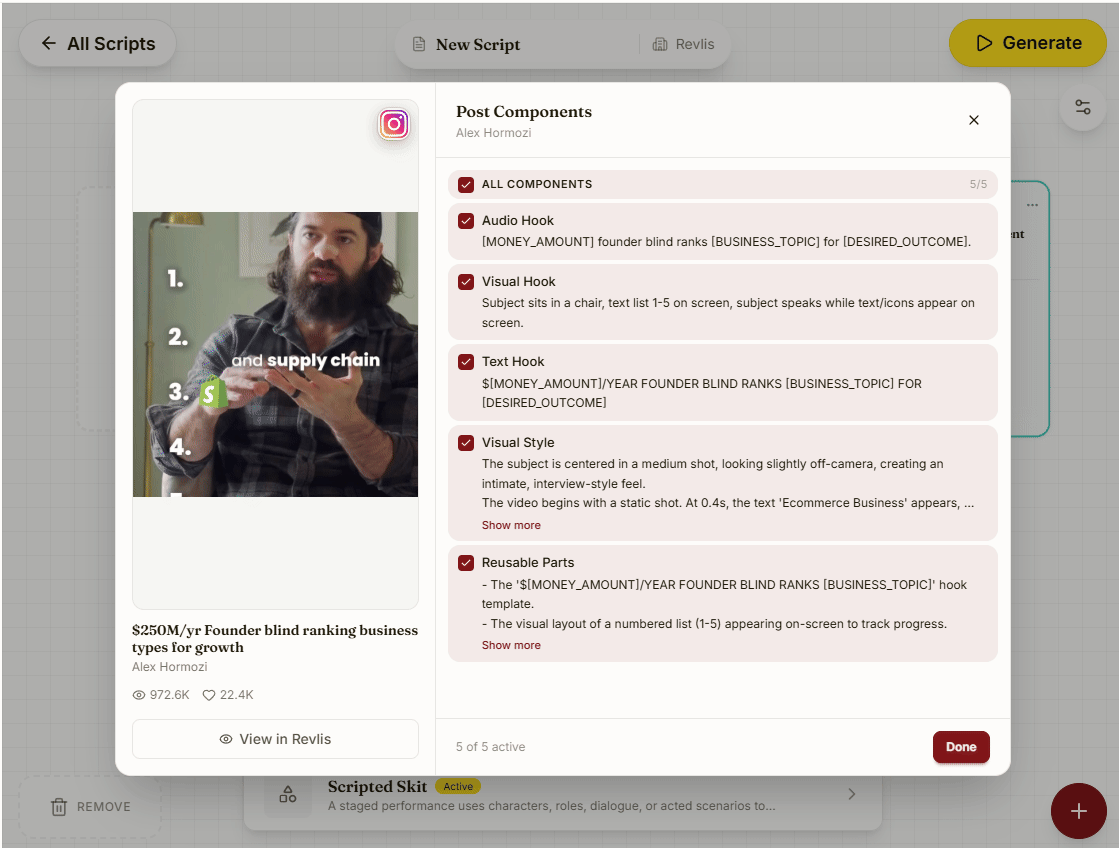
For example:
- Keep Audio Hook and Structure on to learn from the opening and flow.
- Turn Visual Style off when you want the selected Video Style to lead the production direction.
- Turn Target Audience off when your own Audience card should guide the script.
Only the enabled components are included as generation context.
Finish the script
After adding the blueprint:
- Review the Post card and its enabled components.
- Add your own audience, content pillar, focus question, offering, or editorial notes.
- Choose the script settings and Video Style.
- Generate and edit the result.
The result is a script that draws on the enabled patterns from the reference post while staying original to your brand. See The Laboratory for how the rest of the canvas works.